In agentic coding, context is everything. LineClip copies file:line + content in one right-click — paste it to ChatGPT / Claude / Cursor / Copilot and your AI jumps to the exact line. No more "the function near line 40".
AI 结对编程时代,上下文就是效率。LineClip 右键一键复制 文件:行号 + 内容,直接丢给 ChatGPT / Claude / Cursor / Copilot,AI 秒懂位置,不用再说"大概 40 行附近那个函数"。

AI agents are powerful, but vague prompts waste tokens and time. Give the model an exact anchor.
AI 很强,但模糊的描述只会浪费 token 和时间。给模型一个精准锚点。
src/api/UserService.kt:87 fun login(...) tells the agent exactly where to read, edit, or explain — no guessing which login you mean.
src/api/UserService.kt:87 fun login(...) 让 AI 精确知道该读哪一行、改哪一行、解释哪一行——不用猜你说的是哪个 login。
Instead of "the error is in my UserService around the middle", paste one line and the AI has path + line + code. Faster prompts, fewer follow-ups.
不用再写"UserService 中间那段报错了",粘贴一行就带上路径+行号+代码,提问更快,少来回。
GitHub issues, Slack, Discord, Cursor Chat, Claude Code, Copilot Chat — path:line content is the universal format LLMs already understand (like file_path:line_number in tool calls).
GitHub issue、Slack、Discord、Cursor Chat、Claude Code、Copilot Chat 都通用——路径:行号 内容 本就是 LLM 熟悉的格式(如工具调用里的 file_path:line_number)。
You: Please fix the NPE here ->
src/main/kotlin/com/lineclip/CopyLineInfoAction.kt:34 val doc = e.getData(CommonDataKeys.EDITOR)?.document ?: return
AI: Got it — at CopyLineInfoAction.kt:34 the document can be null, add a null-check before accessing line content...你: 帮我修这个 NPE ->
src/main/kotlin/com/lineclip/CopyLineInfoAction.kt:34 val doc = e.getData(CommonDataKeys.EDITOR)?.document ?: return
AI: 明白了,在 CopyLineInfoAction.kt:34 这一行 document 可能为 null,读取行内容前加个空判断即可...
One action, clean output — optimized for both humans and LLMs.
一次操作,干净输出——对人和 LLM 都友好。
Appears in the editor context menu. No toolbar hunting — right-click the line you mean and copy.
直接出现在编辑器右键菜单里,不用找工具栏——对着那一行右键即可。
Copies as relative/path:42 line_content — the exact path:line pattern agents use in tool calls. Paste directly, AI parses it instantly. Need absolute? Use "Copy Line Info (Abs Path)".
默认复制为 相对路径:行号 行内容——正是 Agent 工具调用里 path:line 的格式,直接粘贴,AI 秒解析。需要绝对路径可用 "Copy Line Info (Abs Path)"。
Leading indentation trimmed, trailing whitespace removed. Empty lines copy only path:line — no stray spaces.
自动去除行首缩进与行尾空白,空行仅复制 路径:行号,不带多余空格。
Status bar shows a preview of what was copied, so you know it worked without pasting.
状态栏即时预览已复制内容,不用粘贴也能确认成功。
No default binding to avoid conflicts — assign your own in Settings → Keymap (e.g. Ctrl+Shift+C).
为避免冲突不设默认快捷键,可到 Settings → Keymap 自行绑定(如 Ctrl+Shift+C)。
Long lines (500+ chars), binary files, images — action auto-disables where it shouldn't run.
超长行(500+ 字符)、二进制文件、图片等场景自动禁用,不误触。
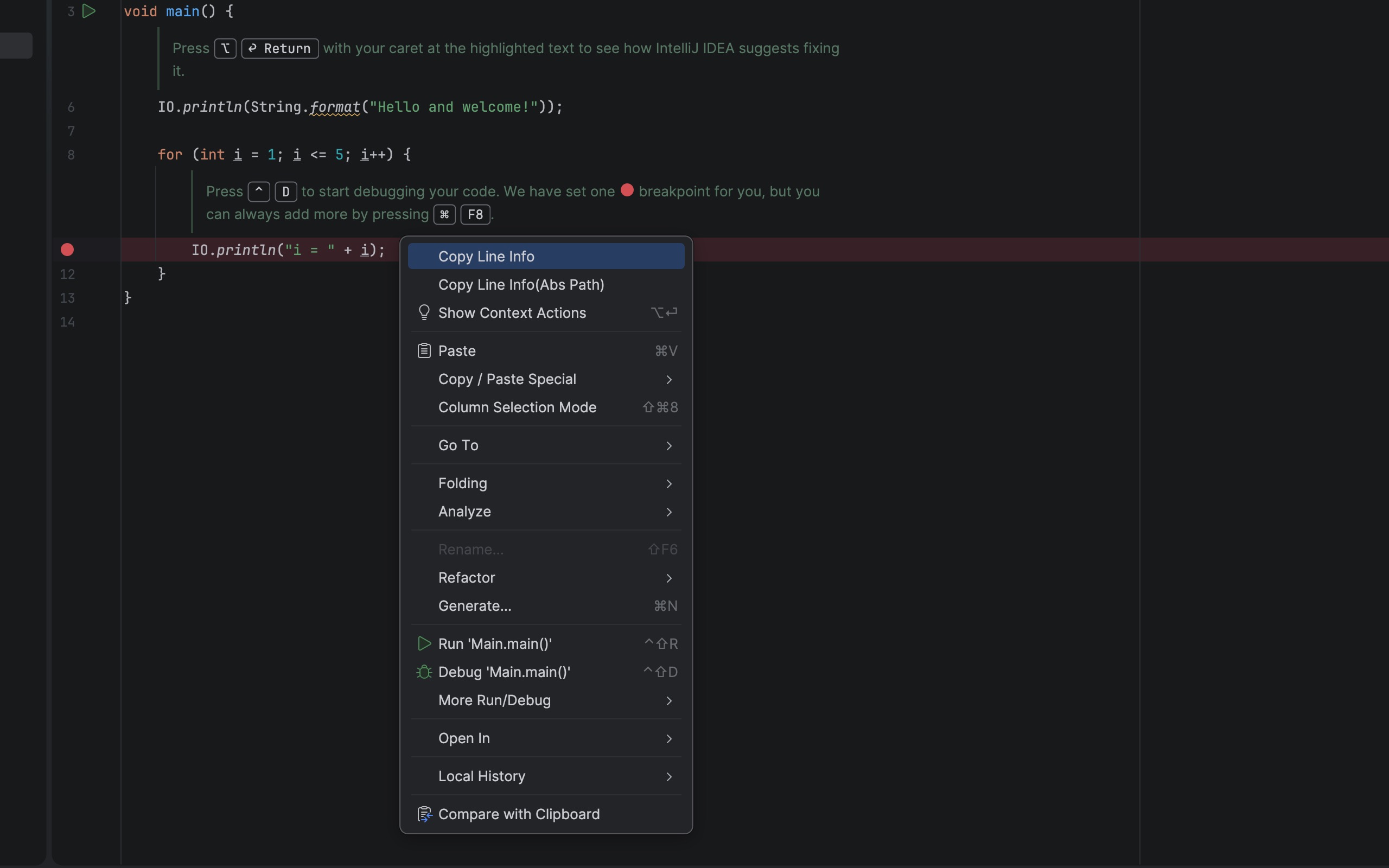
Two ways to copy — same clean format.
两种触发方式,同样干净的格式。
Right-click any line → Copy Line Info (relative) or Copy Line Info (Abs Path) (absolute). 在任意一行右键 → Copy Line Info(相对路径)或 Copy Line Info (Abs Path)(绝对路径)。
src/main/kotlin/Calculator.kt:42 fun calculateTotal(items: List<Item>): Double {
Empty line? → src/main/kotlin/App.kt:15 (no trailing spaces)
空行?→ src/main/kotlin/App.kt:15(不带多余空格)
Settings → Keymap → search "Copy Line Info" → Add Keyboard Shortcut. Settings → Keymap → 搜索 "Copy Line Info" → Add Keyboard Shortcut。
Example: Ctrl+Shift+C → copies instantly
No conflict, your choice.示例: Ctrl+Shift+C → 一键复制
不占默认快捷键,随你定。
Works on any text file. Auto-disabled for binary / images. 适用于任意文本文件,二进制/图片文件自动禁用。
MIT licensed. No ads, no tracking. Build from source or install from Marketplace.
MIT 开源,无广告、无追踪。可从 Marketplace 安装,也可自行构建。
./gradlew buildPlugin./gradlew buildPlugin 自行构建